
Finding a reliable home security camera system in Canada can be confusing.
Every brand says it is the best. Every ad shows perfect images and an easy setup.
But when you start looking deeper, you see how much depends on small details like local storage, battery life, and how the camera performs in cold weather.
This guide focuses on security cameras that work well in Canada.
They record clearly, store footage locally, and do not require monthly subscription fees.
You get control, privacy, and reliability without paying extra every month.
Why Canadians should choose subscription-free cameras
Most modern security cameras rely on cloud storage.
That means your footage is uploaded to company servers and you pay a monthly fee for access.
If you stop paying, your recordings disappear.
For some people, that is fine.
But if you want full ownership of your data, local storage is better.
It uses a memory card or a base station that saves video directly.
Even if the internet goes down, your camera still records.
In Canada, where internet outages are more common in rural areas, this difference matters.
Local storage means your system continues to protect you even when Wi-Fi drops or power flickers.
Key features that matter in Canada
Choosing a camera for Canadian homes is not the same as picking one for mild climates.
Winter temperatures, snow buildup, and remote properties change what you need.
1. Cold weather resistance
Look for cameras that operate at –20°C or lower.
Some models lose battery life fast in freezing conditions.
Hardwired options or solar models are more dependable.
2. Local storage support
You want a camera that records to microSD or a hub.
This ensures you still have footage if the company changes its cloud pricing.
3. Image clarity
A minimum of 1080p resolution is required today.
For outdoor use, 2K or 4K offers clearer license plates and faces.
4. Smart detection
Motion sensors should tell the difference between people, animals, and vehicles.
You do not want to wake up at night because snowflakes triggered an alert.
5. Connectivity
Wi-Fi 2.4 GHz is common, but dual-band models with 5 GHz offer better stability.
Some rural users prefer 4G or 5G cameras with a SIM slot.
6. Power source
Battery cameras are easy to install but weaker in cold months.
Solar or wired models are better long-term for Canadian winters.
7. Warranty and support in Canada
Many U.S. brands do not provide warranty coverage for Canada.
Always confirm Canadian service before buying.
Best Home Security Cameras in Canada (2025)
Below are cameras that are reliable, easy to find in Canadian stores, and perform well in real conditions.
All support local storage or optional cloud plans.
None require a subscription to function.
1. Eufy Security S340 Outdoor Cam (Dual Camera + Solar)
Why it stands out
Eufy has built a reputation for cameras that do not rely on cloud subscriptions.
The S340 offers dual lenses that capture wide and zoomed views together.
It includes a solar panel that keeps the battery charged year-round.
Canadian advantage
Rated to handle freezing temperatures and snow.
The solar panel is practical for homes in Ontario, Alberta, and British Columbia where winter sunlight still gives enough power for maintenance charging.
Best for
Homeowners who want a set-and-forget outdoor camera that requires little maintenance.
Price range
Around $320 to $360 CAD depending on the retailer.
Key specs
3K resolution
360-degree pan and tilt
Local microSD storage up to 128GB
Compatible with Eufy HomeBase or standalone use
Drawbacks
Slightly bulky design and higher upfront cost, but zero ongoing fees.
2. TP-Link Tapo C310 Outdoor Camera
Why it stands out
TP-Link has quietly become one of the best value options for home security in Canada.
The Tapo C310 is simple, wired, and tough.
It works without any subscription and records to a microSD card.
Canadian advantage
The metal body handles cold better than many plastic cameras.
The power adapter is insulated enough for mild outdoor use.
Best for
Homeowners who want a budget outdoor camera that does not compromise image quality.
Price range
Around $80 to $100 CAD.
Key specs
3MP resolution (2304×1296)
MicroSD support up to 256GB
Night vision up to 30 feet
Works with Alexa and Google Assistant
Drawbacks
Wired installation requires access to a power outlet.
Not ideal for renters or apartments without outdoor plugs.
3. EufyCam 3 (S330 Kit)
Why it stands out
The EufyCam 3 is one of the best full systems available in Canada.
It includes a HomeBase hub that stores all footage locally on an expandable hard drive.
You pay once and own the system entirely.
Canadian advantage
The hub ensures secure recording even during internet outages.
The cameras are IP67 rated and built for all-season outdoor use.
Best for
Homeowners who want a full wireless system across multiple entry points.
Price range
Around $800 to $1000 CAD for a two-camera kit.
Key specs
4K ultra-HD resolution
Solar charging panels
Local storage expandable up to 16TB via HDD
Works with Alexa, Google, and Apple HomeKit
Drawbacks
Higher price, but it replaces any need for cloud services.
Setup requires patience for initial pairing.
4. TP-Link Tapo C200 Indoor Wi-Fi Camera
Why it stands out
Not every home needs a full outdoor system.
For indoor security, the Tapo C200 delivers solid quality for very little money.
It has 360-degree rotation, night vision, and local storage.
Canadian advantage
Perfect for apartments, condos, or offices.
Easy to plug in and connect through the Tapo app.
Best for
Monitoring pets, kids, or interior spaces while away.
Price range
About $45 to $60 CAD.
Key specs
1080p resolution
Pan and tilt design
Two-way audio
MicroSD slot for 256GB storage
Drawbacks
Plastic body feels light, but reliability is excellent for the price.
5. Reolink Argus 3 Pro
Why it stands out
Reolink’s Argus 3 Pro is one of the most balanced cameras on this list.
It combines clear 2K video, solar compatibility, and strong night vision.
No subscription is required for local recording.
Canadian advantage
Performs well in –10°C to –20°C range.
The optional solar panel can handle weak winter sunlight.
Best for
Detached houses, garages, or cottages with moderate exposure to cold.
Price range
$180 to $220 CAD.
Key specs
2K resolution
Smart motion detection for people and vehicles
Local microSD recording up to 128GB
Battery and solar power options
Drawbacks
Battery drains faster below –10°C if solar panel not connected.
6. Google Nest Cam (Battery, 2024 model)
Why it stands out
Although Google encourages cloud storage, the Nest Cam Battery also works offline with local video backup when paired with a Nest Aware account.
For users already using Google Home, this is an easy integration.
Canadian advantage
Works reliably in cold down to –20°C.
Available at major retailers across provinces, including Best Buy and Home Depot.
Best for
Homeowners already invested in Google smart home ecosystem.
Price range
Around $240 CAD per camera.
Key specs
1080p HDR video
Optional Nest Aware plan for cloud, but not required for live view and event storage
Battery life up to three months
Weather resistant
Drawbacks
Local backup requires a smart display or hub.
Limited manual control over file access.
7. Arlo Essential Spotlight Camera
Why it stands out
Arlo was once fully subscription-based.
Now, the Essential Spotlight Camera records locally to a base station without ongoing fees.
It still offers cloud storage as an option for those who want smart alerts.
Canadian advantage
Performs well across most provinces.
Compact design suits apartments and semi-detached homes.
Best for
Anyone who wants flexible setup and optional smart features.
Price range
$150 to $180 CAD.
Key specs
1080p HD video
Built-in spotlight and siren
Two-way audio
Local storage via Arlo SmartHub
Drawbacks
Some features like person detection need the subscription, but recording and live view work without it.
8. Wyze Cam v4
Why it stands out
Wyze keeps improving its low-cost lineup.
The Wyze Cam v4 adds better night vision, faster Wi-Fi, and optional local storage.
You can use a microSD card and skip the cloud entirely.
Canadian advantage
Easy availability through Amazon Canada.
Good choice for indoor or sheltered outdoor areas.
Best for
Users who want a compact, affordable, no-fee indoor camera.
Price range
$55 to $70 CAD.
Key specs
2.5K QHD resolution
Color night vision
microSD slot for local recording
IP65 weather rating
Drawbacks
No Apple HomeKit integration.
Occasional lag with live streaming over slower Wi-Fi.
9. Blink Outdoor 4
Why it stands out
Blink, owned by Amazon, focuses on simple battery-powered security.
The Outdoor 4 is its best version yet.
It includes improved motion detection and better low-light performance.
Canadian advantage
Compatible with Alexa and available at all major Canadian retailers.
Cold resistance is fair for most provinces except extreme northern regions.
Best for
Homeowners who want simple setup and minimal maintenance.
Price range
$130 to $160 CAD.
Key specs
1080p HD video
Battery life up to two years
Local storage through Sync Module 2
Compact and wireless
Drawbacks
Limited smart detection without subscription.
Two-way audio quality is basic.
10. Imou Ranger 2C Indoor Camera
Why it stands out
Imou offers good indoor features for a fraction of the cost.
The Ranger 2C delivers clear video and flexible control through its app.
It records directly to a microSD card.
Canadian advantage
Affordable and easily available online.
Best for renters or smaller spaces.
Best for
Those who want reliable indoor monitoring without overpaying.
Price range
$50 to $65 CAD.
Key specs
1080p video
360-degree rotation
Motion alerts and sound detection
Local storage up to 256GB
Drawbacks
Limited smart home integration.
Plastic build feels less premium than others.
11. Lorex 4K Fusion Security System
Why it stands out
Lorex is one of the few brands headquartered in Canada.
It focuses on wired and wireless systems built for cold climates.
The Fusion line gives you 4K clarity, full local storage, and no subscription at all.
Canadian advantage
Since Lorex is Canadian, warranty and parts support are simple.
The 4K cameras record directly to the NVR (network video recorder) included in the kit.
No cloud connection needed.
Best for
Homeowners who want full coverage of a property, not just one or two cameras.
Price range
$600 to $900 CAD for a four-camera set.
Key specs
4K resolution
Night vision up to 120 feet
IP67 weather resistance
Local storage through NVR
Drawbacks
Installation takes longer.
Not ideal for renters or condos without Ethernet access.
12. Reolink Duo 3 PoE
Why it stands out
The Duo 3 combines two lenses into one body for a 180-degree view.
It connects through Power-over-Ethernet for stable performance and full local recording.
Canadian advantage
Rated to handle –25°C temperatures.
It suits detached homes, shops, and warehouses.
Best for
Property owners who want ultra-wide coverage and wired reliability.
Price range
$260 to $320 CAD.
Key specs
Dual 4K lenses
PoE power supply
Smart detection for people, pets, and vehicles
Local microSD and NVR recording
Drawbacks
Needs Ethernet cabling.
Requires more setup knowledge than Wi-Fi models.
13. Eufy Indoor Cam 2K Pan & Tilt
Why it stands out
This compact camera gives clear 2K video and rotates automatically when it senses movement.
It saves footage on microSD and works smoothly with Alexa or Google Home.
Canadian advantage
Affordable and reliable for indoor monitoring.
Handles temperature swings well in unheated rooms or garages.
Best for
Apartments, offices, or rooms where you want remote rotation.
Price range
$80 to $100 CAD.
Key specs
2K resolution
360-degree horizontal pan
AI motion tracking
microSD support up to 128GB
Drawbacks
Not weatherproof.
Requires outlet power.
14. Annke NC400 Color Night Vision Camera
Why it stands out
This camera specializes in low-light detail.
Its lens captures full color at night without infrared glare.
All footage stores locally through NVR or SD card.
Canadian advantage
Strong choice for driveways, parking areas, or rural lots.
Performs well even during snow or fog.
Best for
Users who want accurate nighttime color footage for security incidents.
Price range
$150 to $190 CAD.
Key specs
4MP resolution
True color night vision
IP67 weatherproof rating
PoE and SD storage
Drawbacks
Needs wired installation.
Slightly higher power use.
15. TP-Link Tapo C420S2 Battery Camera System
Why it stands out
This is one of TP-Link’s most flexible wireless kits.
Two cameras connect to a central hub with built-in microSD recording.
You can expand the system up to four cameras.
Canadian advantage
Cold-rated, battery-powered, and easy to install without drilling.
The hub keeps recordings safe even if the cameras are stolen.
Best for
Townhouses or small homes needing two-camera coverage.
Price range
$250 to $300 CAD.
Key specs
2K QHD video
Detachable batteries
Local hub storage up to 256GB
Smart detection and alerts
Drawbacks
Hub must stay powered and near the router.
Batteries lose efficiency in very low temperatures.
Price and performance comparison
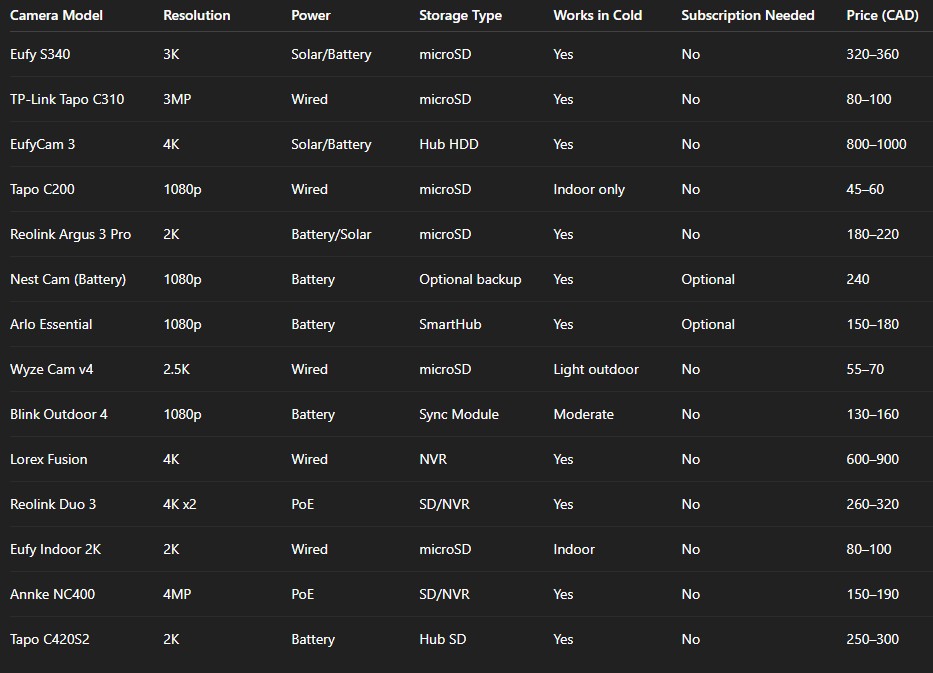
Below is a quick summary comparing the main systems from this guide.
All prices are based on 2025 Canadian retail averages.
What makes these systems good for Canada
Each of these cameras performs well in real Canadian conditions.
That includes snow, fluctuating temperatures, and rural network issues.
They also work without mandatory subscriptions, which keeps costs predictable.
The other factor is privacy.
Local recording gives you ownership of your footage.
It reduces risk of leaks, outages, or dependency on third-party servers.
Battery performance, solar options, and build quality also separate these from cheaper imports that fail after one winter.
Comparing storage types
Before buying, decide how you want to store your footage.
It affects reliability, privacy, and convenience.
Local storage
Uses a microSD card or base hub.
You view files directly or through an app.
No ongoing fees.
Good for privacy and independence from company servers.
Cloud storage
Uploads footage to remote servers.
You access it anywhere, but it usually costs $5 to $15 per month.
Useful if you need multi-day history or want backup after theft.
Hybrid systems
Some brands like Eufy and Arlo offer both options.
You can start with local recording and later add cloud storage for more features.
For most Canadian homeowners, local or hybrid systems make more sense.
They avoid ongoing costs and keep your data close.
How we selected the top cameras
The cameras in this guide were chosen based on:
Cold-weather performance
Subscription-free functionality
Local availability in Canada
Value for money
Customer reliability ratings
We excluded cameras that only work through cloud subscriptions or that show repeated connectivity problems in colder climates.
All models listed here have proven reliability through Canadian user reviews and retail data.
Setting up a home security system in Canada
Installation depends on your home type and how much coverage you need.
Before drilling holes or buying accessories, follow these basics.
1. Check Wi-Fi coverage
Walk around your property using your phone to see where Wi-Fi drops.
If signal is weak, consider a mesh router or extender.
Most security cameras fail not from hardware issues but poor connectivity.
2. Plan camera positions
Front doors, driveways, and backyards are high-traffic zones.
Mount outdoor units above shoulder height but not beyond ladder reach for maintenance.
Avoid pointing directly at windows or bright streetlights.
3. Power source
If you choose wired cameras, confirm outlet distance before purchase.
For battery cameras, keep charging cables handy for winter when battery life shortens.
4. Local storage setup
Format the microSD card inside the app before use.
For NVR or hub systems, connect them through Ethernet for faster data transfer.
5. Privacy settings
In multi-unit buildings, avoid capturing neighbours’ doors or shared spaces.
Every province follows privacy guidelines under the Personal Information Protection Act.
Private use is allowed, but you must respect others’ property boundaries.
6. Test motion zones
Each app lets you set motion areas.
Adjust them until you stop getting false alerts from trees or traffic.
Start narrow, then expand coverage slowly.
7. Backup power
In parts of Ontario or Alberta, power cuts can last hours.
Consider a small UPS (uninterrupted power supply) for the hub or NVR.
It keeps your cameras running even during blackouts.
Winter performance tips
Cameras that survive one Canadian winter usually last years.
Still, cold weather reduces performance if ignored.
Keep batteries warm. Mount cameras close to the house where they get some indoor heat.
Use solar panels with direct sun exposure. Even in winter, short sunlight can top up batteries.
Wipe snow from lenses. Frost buildup blocks infrared sensors and night vision.
Avoid extreme exposure. North-facing mounts get less sunlight and more ice. Shift placement slightly west or south when possible.
Check firmware updates. Brands often release cold-weather fixes mid-season.
Data security and privacy
A home camera protects your space, but it also captures personal data.
To stay safe:
Change default passwords immediately.
Turn off remote viewing when not needed.
Keep firmware updated.
Avoid public Wi-Fi access to your camera app.
If you sell or move, factory-reset all devices.
Some brands like Eufy and Reolink now use AES-128 or AES-256 encryption for footage.
That level of protection keeps your local recordings private even if the hub is stolen.
Buying checklist for Canadians
Before you buy, run through this quick checklist.
Temperature range: Must handle at least –20°C to +40°C.
Local warranty: Confirm the camera is sold by a Canadian distributor.
Storage choice: Prefer models with microSD, NVR, or hub options.
Connectivity: Dual-band Wi-Fi or PoE preferred for stability.
Video quality: At least 1080p, but 2K or 4K is better for license plates.
App usability: Check ratings in the App Store or Google Play.
Night vision: Minimum 25-foot clear range.
Smart detection: Optional but helpful for filtering false alerts.
Expandability: Choose brands with add-on camera options.
Total cost: Include memory cards, mounts, and extension cables in your budget.
Real-world examples
Detached house in Ontario
A homeowner in Kitchener installed two Eufy S340 cameras with solar panels at the front and back.
Even during January, the batteries stayed above 80 percent.
Local recording continued despite two winter outages.
Condo in Vancouver
A renter used a single TP-Link Tapo C200 inside the living room.
The camera provided motion alerts during travel and cost under $60 total.
All recordings stored on a 128GB card, no cloud plan required.
Farm in Saskatchewan
A Reolink Duo 3 PoE covers an entire barn entrance and driveway.
The wired connection never disconnects in storms, and the owner views footage remotely through the NVR.
No ongoing fees, even with daily recording.
These examples show how different homes need different camera setups.
The key is matching coverage area, power, and storage to your lifestyle.
Where to buy in Canada
Most of the cameras listed here are available through major Canadian retailers:
Best Buy Canada
Costco Canada
Amazon.ca
The Source
Home Depot Canada
Lorex official store
Avoid gray-market imports that do not include Canadian plugs or warranty coverage.
They often lack customer support or firmware updates for North American regions.
Local vs imported brands
Local brands like Lorex understand Canadian weather and voltage standards.
Imported models like Reolink or Eufy perform well but require checking for compatible adapters.
Local support can save weeks of downtime during warranty claims.
Imported systems often cost less upfront but might take longer to service if anything breaks.
DIY installation vs professional setup
Most of today’s systems are plug-and-play.
If you can mount shelves or curtain rods, you can install a security camera.
Still, professional installation may help if:
You need multiple PoE cameras wired through walls.
You’re installing a large NVR system.
Your network coverage is complex.
For simple Wi-Fi or solar systems, DIY setup works fine.
Each brand’s app walks you through pairing and calibration.
Common mistakes to avoid
Ignoring Wi-Fi speed. Cameras need at least 2 Mbps per feed for stable video.
Using small SD cards. Get 128GB or larger to avoid overwriting every few days.
Skipping firmware updates. Outdated software causes connection drops.
Mounting too high. Cameras above 10 feet often capture more rooftops than faces.
Forgetting about privacy zones. Most apps let you block certain areas; use it.
Fixing these before setup saves frustration later.
The best overall systems for Canada (2025 summary)
Best all-round system: EufyCam 3
It covers large homes, records in 4K, and runs entirely local.
Zero subscription required.
Best value camera: TP-Link Tapo C310
Simple, affordable, and reliable.
Perfect for basic outdoor monitoring.
Best indoor camera: TP-Link Tapo C200
Low cost and high functionality.
Good for renters or anyone who wants quick setup.
Best cold-weather performance: Lorex Fusion 4K
Made by a Canadian company for Canadian winters.
Excellent for full-property coverage.
Best off-grid option: Reolink Argus 3 Pro
Solar-ready and fully independent from the internet.
Ideal for rural cabins and farms.
Frequently asked questions
1. Do I need internet for local recording?
No. Cameras with SD cards or NVRs record without internet.
You only need Wi-Fi to view footage remotely.
2. Will cold weather damage my battery camera?
No, but it reduces performance. Keep the camera sheltered and use solar panels if possible.
3. Can I use these cameras for businesses?
Yes. Most models listed work for small offices or shops.
Just ensure you follow local privacy rules.
4. What happens if someone steals my camera?
Footage remains safe if stored on a base hub or NVR inside the house.
That is why local hubs matter more than onboard cards for outdoor setups.
5. Are these systems compatible with smart homes?
Yes. Eufy, TP-Link, Arlo, and Google Nest all connect with Alexa or Google Home.
Lorex supports its own app and NVR interface.
Final thoughts
A good home security system in Canada is one you can trust in all seasons.
It keeps recording when the power flickers, the Wi-Fi cuts, or the snow starts falling.
The best systems are not the most expensive.
They are the ones that give you clear video, local control, and peace of mind without extra bills.
Start small if you need to.
One reliable outdoor camera with local storage can do more for safety than five cloud-locked devices.
Then expand slowly as you learn your coverage gaps.
In 2025, Canadians have strong options.
Brands like Eufy, TP-Link, Reolink, and Lorex now provide durable, subscription-free systems designed for real homes, real winters, and real privacy.
